Which classrooms were too hot this week?
Zones versus setpoint gives every room a tile, building by building, portables included. The thermal wall replays the week hour by hour, with the outdoor temperature underneath.
For school districts
Your campuses already run Pelican thermostats. Zonefold reads them and shows which rooms ran hot, what is running right now, and which unit needs a technician first. It puts a modeled cost on after-hours, weekend and empty-room runtime, on one page your business office can check. It never changes a setting.
For your business office
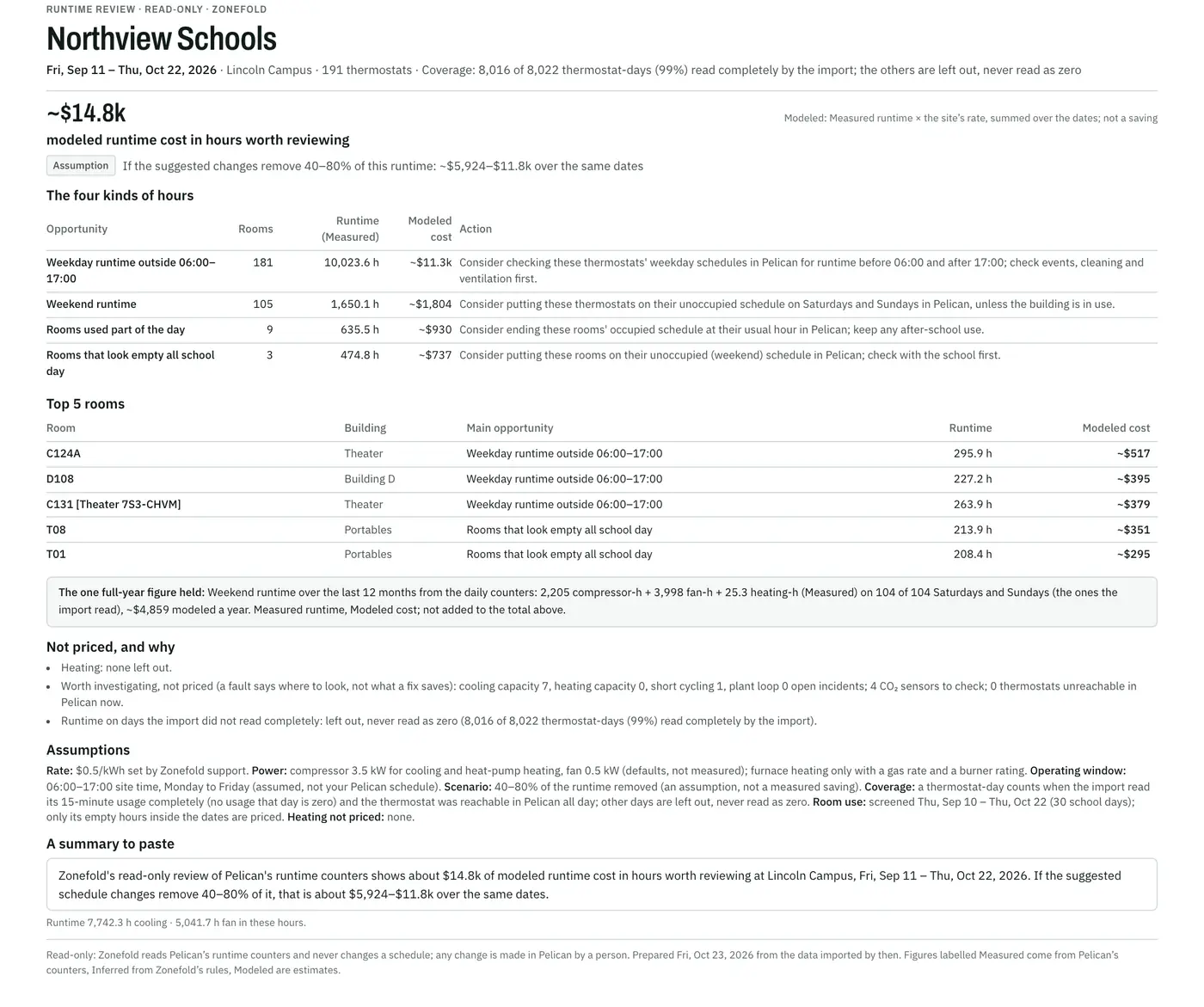
Zonefold's Savings page gives one figure to quote: the modeled runtime cost in hours worth reviewing, over up to the last six weeks, with its dates and the share of thermostat-days Zonefold read completely. Days it did not read are left out, never counted as zero.
The playbook Make the case to your business office walks through it in under two minutes.
The questions districts ask
Zones versus setpoint gives every room a tile, building by building, portables included. The thermal wall replays the week hour by hour, with the outdoor temperature underneath.
Portfolio names one unit to look at first. Its incident carries the evidence: each episode, how long it lasted and how far the room ran off setpoint.
Assign it with a note, and the technician gets an email with a link.
Room use reads the CO₂ sensor in each thermostat that has one: no new sensors. A classroom in use climbs well above outdoor air; one that stays below 500 ppm through school hours very likely had nobody in it.
It screens up to the last 30 school days, leaves likely no-school days out, and shows results from 10. It names rooms that look empty all school day or are used part of it, their runtime while empty and its modeled cost, and a schedule to consider in Pelican. No people are counted or tracked.
Running now shows what every thermostat is doing, by campus and building: cooling, heating, fan only or off, with vacation as Pelican reports it.
Zonefold doesn't know your school calendar, so it shows what is running, not whether it should be. Savings and Room use point to the hours worth a second look.
The Network tab shows each Pelican gateway, which devices are unreachable now, and when several dropped together. The Alarm log keeps Pelican's alarms after Pelican clears them.
Savings adds up weekday runtime outside 06:00–17:00, weekend runtime and Room use's empty hours, and models their cost with your site's electricity rate.
It is labeled Modeled, with its dates and coverage. It is not a meter, a utility bill or a saving: some of that runtime may be needed.
Delegate a campus, a building or a single device to the contractor's company, with an end date. Every change is in the audit log, and you can revoke it at any time.
Opt in to the daily summary email. Once a day, and only when there's something new, it lists new and reopened incidents, ones that closed by themselves, and sites whose imports are late.
Seen on a real campus
Every screen on this site comes from Pelican's public demo site, a California school, with one week of readings from October 4 to 11, 2026. Savings and Room use need weeks of history, so the screenshots repeat that week's real days over the weeks around it, up to October 23, 2026. In them it is renamed Northview Schools and Lincoln Campus.

For your IT team
Zonefold connects to Pelican's cloud, not your network, and only reads. The full details are in the security overview.
Plainly
Tell us which of these matters most to your district. It shapes what we build next.
A pilot, step by step
Pilots are free while we validate the product.
How many campuses, and roughly how many Pelican thermostats.
Your Pelican admin adds a user for Zonefold with read access.
Read-only. A small site imports within minutes, then every 15 minutes.
We walk through the findings with facilities, and IT if they like, including the Savings report once the days are read. You decide whether it's useful.
Free pilot
Tell us your district, how many campuses you run and roughly how many Pelican thermostats.
Start a free pilotOr email hello@zonefold.com